

============ PART A: INPUT (EDIT THIS ONLY) ============

[RATIO: 2:3 / 4:5 / 3:4 / 9:16 / 1:1]
[LAYOUT_VARIANT: pilih satu: 1 / 2 / 3]
[BREAKOUT_ELEMENT: bagian foto yang keluar bingkai, contoh: rock and dry grass in the foreground / sand and beach grass / flowers in the foreground / a tree branch / waves / stairs / a wall edge]
[BREAKOUT_SIDE: bottom / bottom and left / bottom and right / top]
[PAPER_COLOR: warm cream / soft white / light beige / pale gray / soft sage]
[PAPER_TEXTURE: smooth matte / fine cold-press paper / soft linen / none]
[FRAME_STYLE: sharp rectangle with a thin edge / rectangle with a thin white border / rounded rectangle / polaroid style]
[FRAME_MARGIN: wide / medium / narrow]
[SHADOW: soft / very soft / none]

OPTIONAL TEXT (leave "none" for a pure photo):
[TITLE: maksimal 4 kata, or none]
[SUBTITLE: maksimal 8 kata, or none]
[SMALL_LINE: maksimal 6 kata, contoh: nama tempat atau tanggal yang benar, or none]
[TEXT_COLOR: deep warm gray / white / charcoal / deep brown]
[TEXT_POSITION: top / bottom / right side]

PHOTO TO ATTACH: SOURCE_PHOTO (one clear, sharp photo with a clear foreground element and a clear background, preferably a landscape or a travel photo). I confirm that it is a photo I took, or that I have permission to use and edit it, including the people in it (adult only).

DATA RULES:
1. Do NOT say who the people are. Add no names, logos, signatures, or watermarks, and no text except TITLE, SUBTITLE, and SMALL_LINE. If a field is "none", leave that element out completely.
2. Before creating the image, tell me in two short lines what you understood (layout, breakout element, paper) and wait for my "OK".

LAYOUT_VARIANT options:
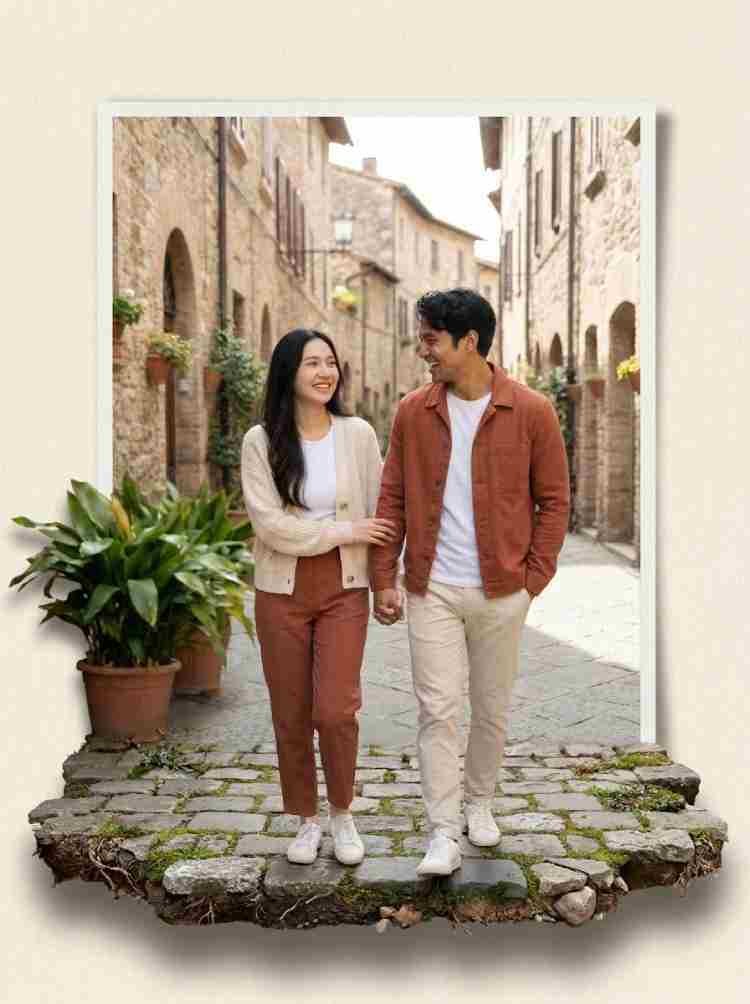
1 = Reference style: the photo sits inside a rectangular frame centered on the paper with a wide margin; BREAKOUT_ELEMENT extends beyond the bottom edge (and the side if BREAKOUT_SIDE says so) and spills onto the paper. The paper above or below the frame is left empty or carries the text.
2 = Offset: the frame sits at the upper part of the sheet, BREAKOUT_ELEMENT extends strongly over the lower edge and across part of the paper below, and the text sits in the open paper area at the bottom.
3 = Double frame: the photo inside a frame, a second thin outline frame offset behind it to look like a stacked card, BREAKOUT_ELEMENT breaks both frames at the bottom.

============ PART B: STYLE (DO NOT CHANGE) ============

TASK: Turn SOURCE_PHOTO into one "pop-out" poster, ratio RATIO: a real photograph inside a frame on a sheet of paper, where a foreground element of the same photo extends beyond the frame onto the paper, as if it were physically sticking out. The result must look like a real printed collage with a subtle 3D effect, not like a digital filter or an illustration.

STEP 0 (do this first): If no photo is attached, stop and ask me to attach one. Do not invent a scene.

PHOTO LOCK (most important):
- Use SOURCE_PHOTO as it is: keep the composition, colors, light, perspective, and every person in it (face if visible, hair, clothing, pose, proportions, skin tone) exactly the same. Do NOT redraw, restyle, beautify, slim, relight, add, remove, or move any person or object. Do not repaint the sky or the mountains. Do not add filters, HDR, or heavy color grading.
- Only crop the photo to fit the frame, and apply minimal edge cleaning for the cutout.
- Keep each person recognizable and unaltered. Do not identify them.

POP-OUT EFFECT RULES (the key look):
- BREAKOUT_ELEMENT is a real part of SOURCE_PHOTO (its own foreground), cut out cleanly along its natural edge, and then extended beyond the frame at BREAKOUT_SIDE onto the paper. Do not invent a new element or a different rock, plant, or object.
- The part that leaves the frame is the SAME image content continuing naturally (same texture, same color, same light and perspective), enlarged slightly if needed, with believable detail. The cutout edge has natural irregularity (grass blades, small stones, uneven rock), with no halo, no jagged outline, and no leftover pixels from the background.
- The break-out element overlaps the frame edge in front of the photo, never behind it, and never covers the person or the main subject, and it never covers more than about one-third of the frame width at the bottom.
- A soft, believable shadow of the element falls on the paper (according to SHADOW), with the same light direction as the photo. Shadow is gentle and realistic.
- The photo inside the frame stays flat and clean, with its original sharpness.

PAPER AND FRAME:
- PAPER_COLOR sheet with PAPER_TEXTURE (very subtle fibers or grain), slightly rounded sheet corners, and an even, soft light across the sheet, with no folds, no stains, no tape, no stickers, and no decoration.
- FRAME_STYLE as chosen: crisp, straight edges, perfectly aligned, with margins according to FRAME_MARGIN. No drop shadow around the frame except a very faint one for depth.

COLOR SYSTEM (restraint is mandatory): the natural colors of the photo and PAPER_COLOR, plus TEXT_COLOR for text. No extra colors, no neon, no filters.

TYPOGRAPHY (only if text is provided): TITLE in a refined serif or a clean sans-serif (choose one) in TEXT_COLOR, placed on the empty paper area at TEXT_POSITION, never over the photo or the breakout element, with generous space. SUBTITLE and SMALL_LINE smaller, in a light weight, with wide letter-spacing. Strong contrast. No effects, no shadows on the text. Spell every word exactly as given. No other text.

COMPOSITION: balanced, generous paper margins, the photo as the clear focus, margins at least 5% on every side, the break-out element visually anchoring the lower part. Follow RATIO.

TEXT RULES: use ONLY the text I provide. Do not add slogans, captions, names, dates, signatures, watermarks, or pseudo-text. If text cannot be rendered correctly, make it smaller rather than invent letters.

QUALITY CHECK before finalizing: (1) the photo inside the frame is unchanged, with people identical, (2) the break-out element is the same image content as the photo foreground, with natural edges and no halo, (3) it overlaps in front of the frame and does not cover the main subject, (4) the shadow on the paper is soft and consistent with the photo light, (5) the paper and frame look clean and printed, (6) only the specified text appears, spelled exactly, (7) no extra objects, logos, or watermarks. If any check fails, fix it and regenerate.

AVOID: changing the people or the photo, repainting the scene, inventing a new foreground object, a pasted or floating look, a glowing halo around the cutout, jagged edges, heavy filters or HDR, fake 3D rendering, extra decorations, tape, stickers, folds, stains on the paper, text over the photo, extra text, a watermark, low contrast.
Salin prompt di atas.
Buka ChatGPT. Kalau punya foto produk atau foto model, lampirkan dulu.
Ganti bagian yang berwarna kuning dengan data usahamu, lalu kirim.
Pilih rasio 9:16 saat membuat gambar agar hasilnya sesuai.