
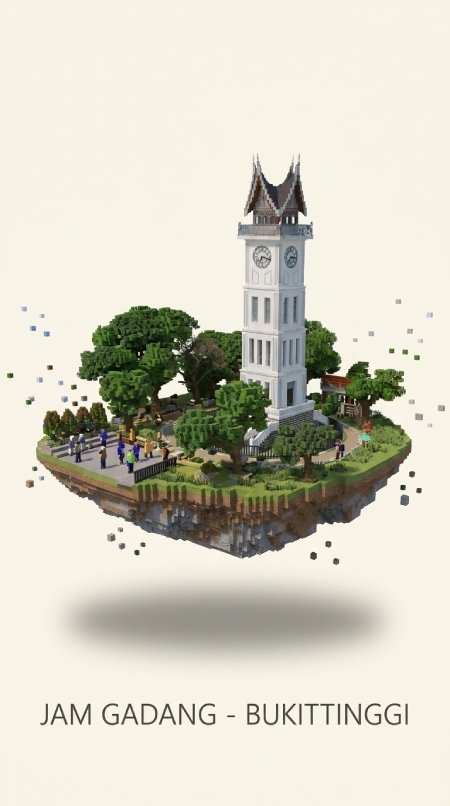
floating 3D voxel diorama + teks judul
 hazdo
1 menit baca
 0 komentar
Transform the entire uploaded reference photograph (@image1) into one highly detailed, three-dimensional voxel diorama presented as a miniature floating island against a clean, minimalist warm cream background.

Reconstruct the exact scene from the reference photograph, including its architecture, people, objects, vegetation, landscape, and recognizable environmental details.

The final artwork should resemble a premium architectural miniature, an intricate 3D voxel sculpture, and a sophisticated gallery exhibition poster.

**IMPORTANT: THE ENTIRE CANVAS MUST CONTAIN ONLY THE 3D VOXEL DIORAMA AND ITS TITLE BELOW. DO NOT INCLUDE THE ORIGINAL PHOTOGRAPH, A PHOTOGRAPHIC PANEL, A HORIZONTAL SPLIT, OR A COLLAGE.**

## 1. CANVAS & COMPOSITION

- Vertical portrait, 3:4 aspect ratio.
- One unified 3D voxel artwork.
- Clean, minimalist gallery-poster composition.
- Warm cream background covering the entire canvas.
- Floating diorama positioned centrally.
- One elegant title beneath the diorama.
- Generous negative space around the artwork.

The floating island should occupy approximately 80% of the canvas width, with enough room for its scattered voxel fragments, floating shadow, and title.

Maintain a balanced composition with a clear visual hierarchy.

## 2. SCENE RECONSTRUCTION

Use @image1 as the exclusive visual reference for the entire diorama.

Faithfully reconstruct the original photographed scene while preserving:
- Main subjects and their recognizable shapes.
- Original architectural structures and proportions.
- Original camera direction and recognizable perspective.
- Spatial arrangement and relative scale of all important elements.
- Positions of buildings, people, trees, vehicles, and objects.
- Original environmental colours and visual characteristics.

Every important element must remain identifiable after conversion into voxel geometry.

The diorama must represent the exact same location and scene as the reference photograph, not a generic voxel environment inspired by it.

## 3. MAIN STRUCTURES & ARCHITECTURE

Rebuild all prominent buildings, structures, and objects using small, crisp, three-dimensional cubes.

Voxel construction characteristics:
- Clean geometric cubes with precise edges.
- Consistent block dimensions and proportions.
- Very subtle bevels along cube edges.
- Matte surfaces with realistic light interaction.
- Clearly visible depth between individual blocks.
- Intricate geometric detailing.

Preserve the original architectural features, including:
- Rooflines, roof tiles, and building silhouettes.
- Windows, doors, balconies, and railings.
- Awnings, poles, signs, and decorative elements.
- Pavements, stairs, fences, and structural details.
- Bikes, motorcycles, cars, and recognizable vehicles.

Maintain the original building colours and distinctive architectural identity.

Signs and lettering visible in @image1 should be recreated as small, readable printed surfaces integrated into the voxel structures. Preserve their original wording and spelling whenever possible.

Do not invent additional buildings or replace recognizable structures with generic designs.

## 4. PEOPLE & VOXEL CHARACTERS

Convert every visible person in @image1 into a miniature voxel character.

Preserve:
- The original number of people.
- Relative height and body proportions.
- Original positions and orientations.
- Original poses, gestures, and body language.
- Clothing silhouettes and outfit colours.
- Distinctive accessories where visible.

Use simplified block-based facial features and geometric anatomy while retaining recognizable characteristics.

Every character should feel naturally integrated into the miniature environment.

Do not add extra people, change existing poses, or omit important characters.

## 5. SKY & DISTANT ENVIRONMENT

Reconstruct the background as a charming three-dimensional voxel environment.

**Sky:**
- A softly stepped, pixelated blue-sky dome.
- A few volumetric white voxel clouds.
- Subtle tonal variations.
- Soft atmospheric depth.

**Distant scenery:**
- Preserve the original mountains, skyline, distant buildings, and landscape features from @image1.
- Translate distant structures into simplified pastel voxel forms.
- Use progressively softer details toward the horizon.
- Maintain the original scene's dominant background colours.

The distant environment should complement the main structures without overpowering them.

Do not introduce scenery that is absent from the original photograph.

## 6. TREES & NATURAL ELEMENTS

Transform all visible trees, plants, and natural elements into chunky three-dimensional voxel vegetation.

Use:
- Geometric brown cube trunks.
- Layered green cube-shaped foliage.
- Two or three coordinated shades of green.
- Clearly defined block-based branches and leaves.
- Small voxel plants, grass, and shrubs where present.

Preserve the original placement, scale, and recognizable silhouettes of the vegetation.

The greenery should feel organic despite its geometric construction.

## 7. FLOATING ISLAND & TERRAIN CROSS-SECTION

Place the entire reconstructed scene on a thick, three-dimensional floating voxel island.

The island should resemble a carefully sculpted miniature cross-section of the original ground.

**TOP SURFACE:**

Recreate the actual ground from @image1 using voxel geometry, preserving its original materials and appearance:
- Pavement and sidewalks.
- Concrete and stone tiles.
- Asphalt roads.
- Grass and soil.
- Natural terrain and other visible ground details.

**UNDERSIDE:**

Create a substantial layered cross-section featuring:
- Green grass along the uppermost edge where appropriate.
- Warm brown soil layers.
- Grey stone and rocky strata.
- Irregular stepped geometric formations.
- A jagged, naturally uneven underside.

Add a few tiny detached voxel cubes beneath the island to emphasize its floating appearance.

The underside must have visible depth, solid volume, and believable geometric construction.

The entire scene should sit securely on this floating island, with no disconnected or unsupported major structures.

## 8. DISSOLVING VOXEL EDGES

Create an elegant pixel-dissolving effect around selected outer edges of the diorama.

Apply the effect selectively to:
- Outer edges of the sky.
- Distant trees and vegetation.
- Peripheral architectural silhouettes.
- Outer contours of the floating island.

Allow individual cubes to break away from the scene and drift outward naturally.

Use scattered voxel fragments in soft colours sampled from the original photograph:
- Sky blue.
- Sand and warm orange.
- Leaf green.
- Stone grey.
- Muted earth tones.

The cubes should gradually become smaller, fewer, and more dispersed farther away from the main diorama.

Keep the main subject, important architecture, people, and central scene completely recognizable and structurally intact.

The dissolving effect should look artistic and intentional, not like the entire scene is disintegrating.

## 9. 3D MATERIALS & VOXEL GEOMETRY

Render the entire environment as a physically dimensional voxel sculpture.

Every block must have:
- Clearly defined front, side, and top faces.
- Consistent geometric proportions.
- Crisp edges and subtle bevels.
- Natural ambient shading.
- Realistic contact between adjacent blocks.
- Matte material properties.

Avoid flat pixel-art surfaces.

The diorama should have the visual quality of a professionally modeled 3D miniature, with intricate block construction and carefully controlled geometric details.

## 10. LIGHTING & RENDERING

Use soft, bright daylight studio illumination.

Lighting direction:
- Main light source from the upper left.
- Gentle ambient illumination across the entire scene.
- Soft ambient occlusion between voxel blocks.
- Subtle shadows beneath buildings and structures.
- Delicate highlights along cube edges.
- Natural depth and realistic shading.

Use clean, slightly saturated colours that preserve the visual identity of the original photograph.

Add a soft, blurred grey floating shadow directly beneath the island to create a convincing sense of suspension.

Maintain sharp focus throughout the diorama, with crisp geometry and polished 3D rendering.

## 11. BACKGROUND & GALLERY PRESENTATION

Place the floating voxel diorama against a completely clean, flat warm cream background.

**Exact background colour: #F7F3EC**

Background requirements:
- Uniform, solid cream colour.
- Smooth and completely untextured.
- No gradients.
- No patterns or paper grain.
- No additional objects.
- No decorative elements.

The background must cover the entire canvas, including the space surrounding and beneath the floating island.

Centre the diorama within the composition, leaving generous negative space for an elegant gallery-style presentation.

## 12. TITLE & TYPOGRAPHY — MAIN TEXT BELOW THE DIORAMA

Add one elegant, carefully typeset title beneath the floating voxel island and its soft shadow, positioned horizontally at the centre near the bottom of the canvas.

**TITLE CONTENT:**

Automatically identify the main location, building, landmark, or subject depicted in @image1.

Use its actual recognizable name as the main title.

If the photograph contains a clearly visible place name or established landmark, reproduce its correct name.

If no identifiable name or location exists, create a short, elegant descriptive title based on the main subject.

**TYPOGRAPHY STYLE:**
- All uppercase letters.
- Thin, elegant, minimalist sans-serif typeface.
- Dark charcoal grey (#454545).
- Wide and refined letter spacing.
- Clean, precise letterforms.
- Approximately 3% of the total canvas height.
- Horizontally centred alignment.
- Sophisticated contemporary editorial design.

**TITLE POSITIONING:**

Place the title directly beneath the floating island's shadow, with comfortable vertical spacing.

Keep the title completely separate from the diorama, floating shadow, and scattered voxel fragments.

Leave generous, clean cream negative space around the typography.

The title should resemble a discreet location caption on a premium architectural exhibition poster, adding a refined finishing touch without competing with the 3D artwork.

**STRICT TEXT RULES:**
- Only one main title.
- No subtitle or description.
- No dates, numbers, or coordinates.
- No hashtags, social media handles, or credits.
- No decorative typography or extra labels.
- No watermark or signature.
- Ensure correct spelling and legibility.

Nothing should appear below the title.

## 13. FINAL OUTPUT & VISUAL DIRECTION

- One complete unified 3D voxel diorama.
- Vertical 3:4 portrait composition.
- Entire reference photograph transformed into 3D voxel artwork.
- Centred floating island with visible geometric underside.
- Highly detailed miniature architecture and characters.
- Selective dissolving voxel fragments.
- Clean warm cream gallery background.
- One minimalist title beneath the diorama.
- Premium-quality 3D rendering.
- Crisp details, realistic lighting, and polished materials.

Create a charming yet sophisticated miniature world reconstructed entirely from the uploaded photograph.

The scene should appear as a meticulously crafted floating 3D voxel island, with recognizable architecture, miniature people, geometric trees, layered terrain, and delicate cubes dissolving into the surrounding space.

Present it as a premium collectible 3D art piece in a minimalist gallery setting.

## 14. STRICT NEGATIVE CONSTRAINTS

Do not:
- Include the original photographic image.
- Create a photographic upper section or horizontal split.
- Create a collage or multiple panels.
- Use flat 2D pixel art.
- Create a generic Minecraft screenshot appearance.
- Use blurry, melted, or irregular cubes.
- Change the original scene's identity or recognizable layout.
- Add extra people, buildings, vehicles, or objects.
- Add unnecessary background elements.
- Use dark, textured, or patterned backgrounds.
- Add borders, frames, or decorative lines.
- Add extra typography, random text, subtitles, watermarks, signatures, or logos.
- Place any element beneath the main title.

**FINAL RESULT: ONE SINGLE VERTICAL 3:4 MINIMALIST GALLERY POSTER — A COMPLETE, HIGHLY DETAILED FLOATING 3D VOXEL DIORAMA RECONSTRUCTED FROM THE ENTIRE REFERENCE PHOTOGRAPH, WITH SCATTERED DISSOLVING CUBES, A CLEAN #F7F3EC CREAM BACKGROUND, AND ONE ELEGANT UPPERCASE TITLE CENTRED DIRECTLY BELOW THE DIORAMA.**
Salin prompt di atas.
Buka ChatGPT. Kalau punya foto produk atau foto model, lampirkan dulu.
Ganti bagian yang berwarna kuning dengan data usahamu, lalu kirim.
Pilih rasio 9:16 saat membuat gambar agar hasilnya sesuai.
Prompt Lainnya

Berita Terkait
 Cara Membuat Website Modern dengan Prompt AI
26 November 2026
 50 Prompt Motion Graphic untuk Claude Code: Lengkap dengan Contoh dan Siap Digunakan
26 November 2026
15 Prompt Codes ChatGPT untuk Belajar Apa Saja, Lengkap dengan Contohnya
25 November 2026
Cara Membedakan Video Asli dan Video Buatan AI di 2027
25 November 2026
Cara Membuat AI Creative Assistant untuk Konten Video Long dan Short
24 November 2026
Spoiler One Piece 1200 : Luffy Melawan Awakening Zoan
24 November 2026