

hazdo.web.id – Pernah melihat sebuah foto yang terlihat biasa saja, tetapi setelah diedit tampak seperti adegan dalam film Hollywood? Efek tersebut dikenal sebagai Cinematic Relight, sebuah teknik yang kini semakin populer berkat perkembangan teknologi AI.
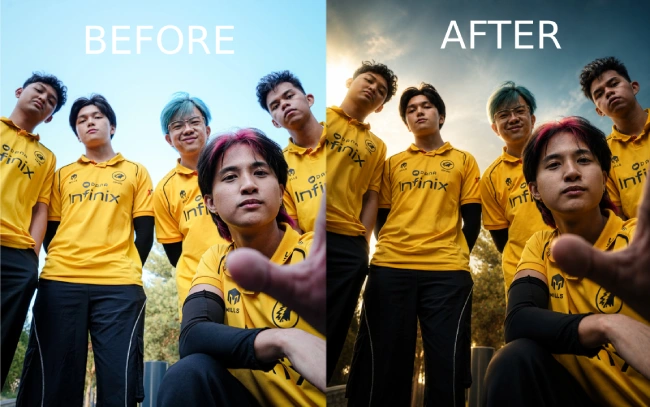
Berbeda dengan filter biasa yang sering kali mengubah wajah atau membuat hasil terlihat seperti gambar AI, Cinematic Relight hanya berfokus pada pencahayaan. Wajah, pose, pakaian, hingga latar belakang tetap sama seperti foto asli, namun pencahayaan dibuat jauh lebih dramatis sehingga menghasilkan foto dengan kualitas editorial profesional.


Artikel ini akan membahas apa itu Cinematic Relight, bagaimana cara kerjanya, serta bagaimana menggunakan prompt yang tepat agar AI menghasilkan foto yang tetap natural namun terlihat seperti dipotret menggunakan setup lighting profesional.
Apa Itu Cinematic Relight?
Cinematic Relight adalah teknik mengubah pencahayaan pada foto menggunakan AI tanpa mengubah identitas maupun komposisi gambar.
Teknik ini tidak mengganti wajah, tidak menambahkan objek baru, dan tidak mengubah lokasi pemotretan. AI hanya “menata ulang” arah cahaya sehingga foto memiliki dimensi, kedalaman, dan nuansa sinematik layaknya produksi film.
Hasil akhirnya terlihat seperti fotografer menggunakan berbagai lampu studio premium saat mengambil foto tersebut.
Beberapa perubahan yang biasanya muncul antara lain:
- Cahaya utama (key light) lebih terarah.
- Bayangan menjadi lebih dramatis.
- Rim light muncul di tepi tubuh.
- Background menjadi lebih gelap namun tetap dikenali.
- Detail wajah semakin hidup.
- Kedalaman foto meningkat.
Kelebihan Menggunakan Prompt Cinematic Relight
Prompt ini memiliki instruksi yang sangat detail sehingga AI memahami bahwa prioritas utamanya adalah menjaga foto asli.
Beberapa kelebihannya meliputi:
1. Identitas Tetap Sama
AI diminta mempertahankan 100% identitas subjek, termasuk:
- bentuk wajah
- warna kulit
- ekspresi
- gaya rambut
- proporsi tubuh
Hal ini membuat hasil terlihat alami.
2. Background Tidak Diganti
Berbeda dengan prompt AI lain, lokasi pemotretan tetap dipertahankan.
Gedung, pepohonan, jalan, langit, hingga benda-benda di sekitar tetap berada pada posisi semula.
3. Lighting Lebih Dramatis
Prompt mengarahkan AI untuk membuat pencahayaan seperti studio profesional dengan kombinasi:
- directional key light
- soft fill light
- rim light
- atmospheric shadow
- volumetric lighting
Kombinasi tersebut membuat foto tampak lebih mahal.
4. Tekstur Tetap Natural
Kulit tidak dibuat terlalu halus.
Detail seperti:
- pori-pori
- tekstur wajah
- kain pakaian
- jahitan
- logo
tetap dipertahankan.
Cara Menggunakan Prompt Cinematic Relight
Langkah penggunaannya cukup sederhana.
Langkah 1 :
Upload foto berkualitas tinggi.
Semakin baik resolusinya, semakin maksimal hasil relighting.
Langkah 2 :
Salin prompt Cinematic Relight :
Transform the uploaded image into a dramatically relit, ultra-cinematic editorial photograph while preserving the original image exactly.
Maintain 100% of the subject’s identity, facial structure, skin tone, hairstyle, expression, pose, body proportions, outfit, accessories, hand placement, environment, framing, perspective, camera angle, and aspect ratio. Do not redesign, replace, reposition, or regenerate any important element.
Relight the existing scene with a premium cinematic lighting setup:
a strong directional key light from above and slightly behind the subject, controlled soft fill light on the face and front of the body, luminous rim lighting around the hair, shoulders, arms, torso, legs, and clothing edges, deeper shadows and richer contrast for strong dimensional separation, realistic light falloff across the subject and surrounding environment , subtle warm highlights balanced with cool atmospheric shadows.
Darken and simplify the existing background while keeping the original location clearly recognizable. Do not replace the background or turn it into a different setting. Preserve all architecture, objects, skyline details, surfaces, and environmental elements in their original positions.
Add subtle cinematic atmosphere only where physically appropriate:
gentle environmental haze, soft volumetric light, restrained background bokeh
natural lens bloom around bright highlights, subtle light diffusion
realistic reflected light on nearby surfaces, enhanced depth between the subject and background
Shape the light around the face so the eyes, cheekbones, nose bridge, lips, and jawline remain clearly defined. Preserve natural skin texture, pores, fine facial detail, and realistic tonal variation. Avoid plastic skin, beauty-filter smoothing, artificial facial reconstruction, oversharpening, or CGI-like rendering.
Enhance the outfit using realistic material response. Preserve the exact design, stitching, textures, damage, patterns, logos, gloves, and fabric structure. Allow highlights to reveal the material naturally without changing its colour or making it unnaturally glossy.
The relighting should feel bold, expensive, cinematic, and photographically believable—like the same original photograph captured with a professional film-lighting setup.
The final result must remain unmistakably the same image, with only the lighting, contrast, atmosphere, and depth professionally transformed.
Do not change the subject, face, pose, outfit, background layout, objects, composition, crop, lens perspective, or image dimensions. Do not add new props, people, lights, buildings, or environmental elements.
source:(@thepromptshub)
Langkah 3 :
Paste prompt ke AI Image Generator yang mendukung pengolahan gambar berbasis instruksi.
Langkah 4
Generate gambar.
AI akan melakukan perubahan hanya pada pencahayaan tanpa mengubah elemen penting lainnya.
Cinematic Relight merupakan salah satu teknik AI yang paling menarik saat ini karena mampu meningkatkan kualitas visual foto tanpa mengubah identitas subjek maupun komposisi gambar.
Dengan prompt yang tepat, AI hanya memodifikasi pencahayaan, kontras, kedalaman, dan atmosfer sehingga hasil akhirnya tampak seperti dipotret menggunakan peralatan lighting profesional.