

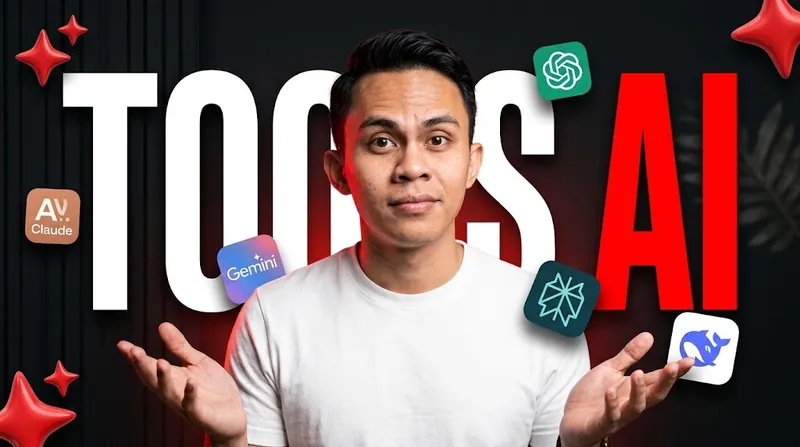
Use the uploaded image as the main subject reference. The person in the final thumbnail must be the person from the uploaded image, with the face, hair, skin tone, and facial features kept exactly the same and clearly recognizable. Do not change the face, do not beautify it into a different person, and do not make it look generic or AI-made.

Create a high-impact, click-worthy YouTube thumbnail about AI tools, in a bold layered typography style: giant text behind the person, floating app icons around them, glossy red accent shapes, and a dark high-contrast background.

SUBJECT

Place the person from the uploaded image in the center of the frame, shown from the chest up, large and sharp, occupying roughly 55-65% of the frame height. Pose: slightly leaning toward the camera, both hands raised and open in an expressive "what do you think?" explaining gesture, with a confident, curious, slightly raised-eyebrow expression, looking straight at the camera. Wearing a plain clean white crew-neck t-shirt. Clean cut-out edges with a subtle thin red rim light around the person to separate them from the dark background.

BACKGROUND

Dark, near-black charcoal wall with subtle vertical slat panel texture and a soft vignette. Add a very faint blurred plant leaf at the lower left for depth, and a subtle red glow behind the person. Keep the background dark, clean, and uncluttered so the text and icons pop.

TEXT (THE MAIN HOOK)

Giant bold condensed sans-serif text spelling "TOOLS AI" (heavy impact-style font, all caps), placed behind the person so the person overlaps the middle of the text:
* "TOOLS" on the left of the head, in pure white
* "AI" on the right of the head, in bold vivid red
* The letters must be perfectly spelled and fully readable, with the person's head and shoulders partially covering only the inner edges of the letters
* Text spans most of the frame width, with a subtle soft shadow for depth, no outline, no glow

Do not add any other text, subtitle, or words anywhere in the image.

FLOATING AI LOGOS

Place 4 to 6 floating rounded-square app icons around the person, three on the left side and three on the right side, at different heights and sizes, each slightly tilted at different angles, with soft shadows and a subtle floating feel. Use the real, recognizable official logos of these AI tools, drawn accurately and not redesigned:
* ChatGPT
* Gemini
* Claude
* [ OPTIONAL: Perplexity / Grok / DeepSeek / Microsoft Copilot / Midjourney ]

Keep each logo exactly as its real brand design. Do not invent fake logos, do not add text next to the icons, and do not let the icons cover the person's face or hands.

ACCENT ELEMENTS

Add 2 to 4 large glossy 3D red sparkle-star shapes (the AI sparkle symbol) in the corners and edges of the frame, partially cropped and slightly blurred in some places for depth. Use only red as the accent color, matching the "AI" text.

LIGHTING AND COLOR

Bright, even, soft key light on the person's face with gentle contrast, crisp skin detail, and a clean modern look. Strong contrast between the white text, red accents, and dark background. Rich saturated colors, sharp focus on the person, and a slight depth of field on the icons and background shapes.

COMPOSITION

Person centered, text behind, icons floating on both sides in a roughly balanced but not perfectly symmetrical arrangement. Keep the bottom-right corner relatively clear of important details, because YouTube places the video duration there. Everything must remain clearly readable when shrunk to a small mobile thumbnail size.

AVOID

Changing the person's face or identity, misspelled or extra text, subtitles, distorted or fake logos, logos with garbled text, extra fingers or malformed hands, cluttered background, too many icons, icons covering the face, blurry subject, low contrast text, text in front of the person, cartoon or illustrated style, watermarks, and obvious cutout artifacts.
Salin prompt di atas.
Buka ChatGPT. Kalau punya foto produk atau foto model, lampirkan dulu.
Ganti bagian yang berwarna kuning dengan data usahamu, lalu kirim.
Pilih rasio 16:9 saat membuat gambar agar hasilnya sesuai.
Thumbnail Tools AI Teks Raksasa
Thumbnail YouTube · rasio 16:9